
Dieselwin logo
Home home 013 dieselwin 1568x1003

DieselWin App: Bingo Slots in Your Pocket

Updated: 10 November 2026

Playing your favourite games on the go should be as simple as settling down on the sofa with a warm cup of tea. Whether you are checking your bingo cards during a lunch break or spinning a few slots while waiting for the kettle to boil, the DieselWin app and mobile site are designed to be straightforward. You do not need to be a technology expert to find your way around the menus, and everything is organised to help you keep a steady, calm pace.

DieselWin app at a glance

The DieselWin mobile app setup keeps things tidy and accessible for everyone. If you use an iPhone, there is DieselWin’s own iOS app with a small bonus for installing it: 20 free spins, with x40 wagering on winnings. For Android users, the process is even simpler, as you use your mobile browser and add the site to your home screen just like a regular app icon. You can navigate quickly using the bottom menu, which gives instant access to Casino, Promotions, the Join Now button, Search and Sports. Payments are just as easy, with Apple Pay deposits accepted from £20 up to £800.

FeatureDetail
iOS appDieselWin’s own app with an install bonus (20 free spins, x40 wagering)
Android accessMobile site added to the home screen
Bottom menuCasino, Promotions, Join Now, Search, Sports
Apple Pay deposits£20 to £800 per deposit
Data use (HD)About 1 GB per hour
Data use (SD)About 300 MB per hour
SupportLive chat 24/7 via Contact Support

Which one suits you comes down to the phone in your hand. On an iPhone, the app is the tidier choice: it opens straight to your lobby, it remembers your sign-in, and it pays the 20 install spins. On Android, the home-screen shortcut gives you the same games, the same cashier and the same live chat, just inside the browser. Either way, your balance, favourites and VIP Club points are shared with the desktop site, so you can start a bingo slot session on the laptop and finish it on the sofa. The one minus is plain: there is no separate Android app to download, and we would not install any file that claims to be one.
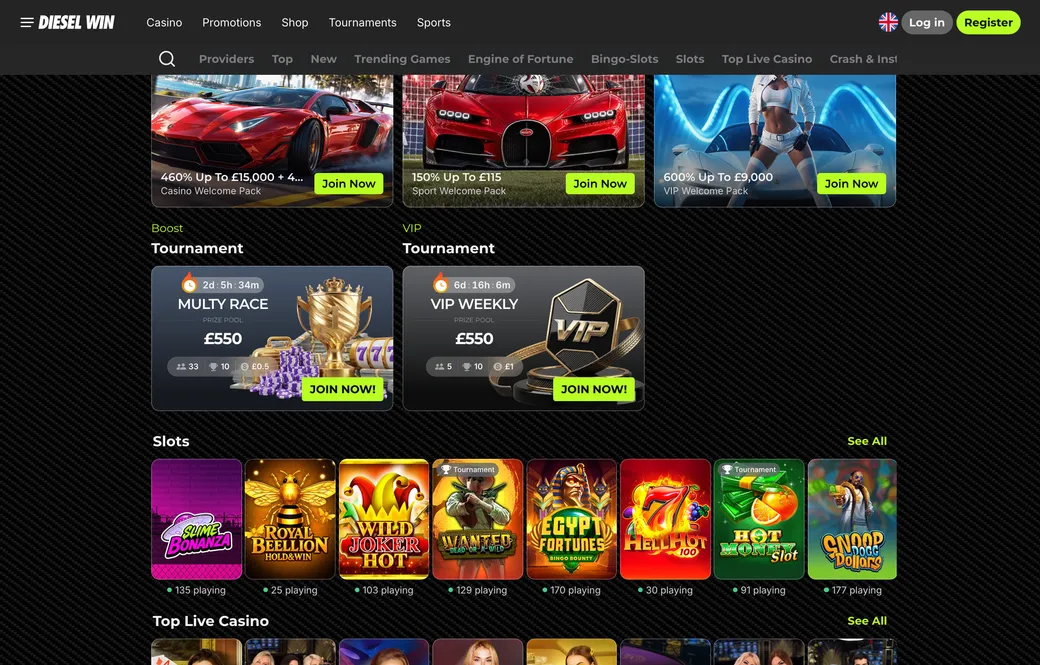
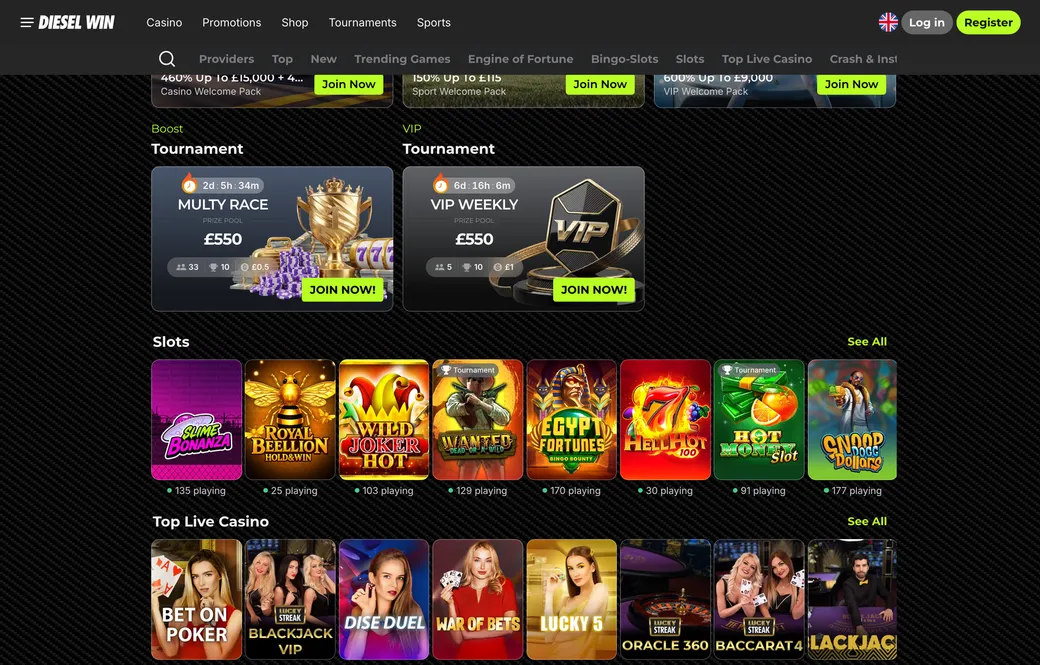
The DieselWin iOS app adds 20 free spins when you install it, and the bottom menu keeps Casino, Promotions and Search one tap away.

Home home 014 dieselwin 1568x1003

DieselWin bingo slots on mobile

One of the most pleasant ways to pass the time is with Bingo-Slots, and these games work beautifully in portrait mode on a smartphone. On a smaller screen, the layout keeps the important parts of the game clearly visible. You will typically find one to four cards on your screen, with 30 balls drawn per round. If you are a number or two short of a line, you can buy extra balls directly on the screen, with the price shown before each one. Because cards start from just £0.10, it is easy to keep your spending exactly where you want it. The interface is clean and uncluttered, a point our DieselWin review also makes, so you are not overwhelmed by flashing lights or confusing buttons.

To create your own quick-access icon on an Android phone, open the DieselWin site in your mobile browser. Look for the three-dot menu in the corner of your browser window, usually at the top or bottom. From the list that appears, select “Add to Home screen”. A prompt asks you to confirm the name, and once you tap “Add”, an icon appears on your phone’s main screen, exactly like your other apps. This saves you typing in the address every time you want to play, and it makes this casino app feel like any other app on your phone.

On an iPhone, installing DieselWin’s own app takes a couple of minutes. Open the mobile site in Safari, look for the Install & Get Bonus prompt, follow the steps to install the app, and sign in with the e-mail and password you already use. The 20 free spins for installing it are worth £0.10 each and run on popular Hold and Win slots such as Buffalo Claws Expanded or Sun of Egypt 3, with x40 wagering on whatever they win and 7 days to use them. Keep the app updated, because new versions fix small glitches and keep the cashier screens tidy.

Paying in from the phone is where the app feels most natural. In the cashier, choose Apple Pay, type an amount between £20 and £800, confirm with Face ID or Touch ID, and the balance updates straight away with no fee. On Android, Google Pay works the same way within the same limits. If you like to keep things tidy, set a weekly deposit limit in the account settings on your phone before you play; it applies to the website and the app alike.

Getting help while playing on your phone is just as simple as on a computer. If you have a question about a game or need to check your balance, the Contact Support button is always there in the mobile interface. Tapping it connects you to live chat, which runs 24/7, and you will typically get a helpful response within one to three minutes. If a game freezes or you just cannot find what you are looking for, a member of the support team is there to assist you.

You may also want to check your phone’s notification settings. Some players like to allow notifications so they hear about new games or account messages without logging in to check. If you prefer a quieter experience, go into your phone’s settings under “Apps” or “Notifications” and turn them off. Managing your settings this way keeps your phone a tool for your enjoyment rather than a source of distraction.

When you are playing away from home, keep an eye on your mobile data. Live games and high-definition streams use more data than simple browsing: an hour of HD live play uses about 1 GB. If you prefer to save data, switch the stream to standard definition, which uses about 300 MB per hour. This is a simple way to make your data package last longer, especially if you enjoy a game on the bus or in a coffee shop.

Lastly, playing on your phone is a very personal experience, so keep an eye on your battery and your time. Mobile devices can run down quickly during a long session, and it is all too easy for minutes to turn into hours. Take regular breaks, stretch your legs, and remember that you can always come back later. Playing within your limits is the best way to make sure the DieselWin mobile app stays a lighthearted hobby. 18+ only, and GamCare and BeGambleAware are there if you ever need free, confidential advice.

On Android, DieselWin runs in the mobile browser and can sit on your home screen like an app. 18+, play within your limits.

Home home 015 dieselwin 1568x1003

DieselWin app FAQ

  • How do I get the DieselWin app on my iPhone or Android phone?

    On an iPhone, install DieselWin’s own iOS casino app and you get an install bonus of 20 free spins with x40 wagering. Android users do not need a separate file, as you simply add the mobile site to your home screen for quick access. Both options give you the bottom menu with Casino, Promotions, Join Now, Search and Sports.

  • Can I play bingo and casual games on the DieselWin mobile app?

    Yes, the mobile lobby has the Bingo-Slots category alongside shelves such as Lucky Boom and Engine of Fortune. You can open Platipus titles like Lucky Shamrock Bingo and Wild Bingo, or try Lucky Barrel by Onlyplay and Zumba Twist by Spinoro. The cards fit a portrait screen, so a quick game from the sofa is easy.

  • What payment methods work in the DieselWin casino app for UK players?

    Topping up on your phone is instant and free, with Apple Pay and Google Pay taking £20 to £800. Cards, Monzo, Revolut and online banking take £20 to £2,000, and crypto goes up to £10,000. Withdrawals start at £50 and sit pending for up to 24 hours once your ID check is done.

  • Is there a welcome bonus when I join through the DieselWin app?

    Signing up on your phone is the same single form, with your e-mail, a password, the Terms of Service tick and your choice of welcome pack. Bingo and slot fans usually pick the Casino Welcome Pack, 460% up to £15,000 plus 460 free spins over the first four deposits of £20 or more. The 20 install spins from the iOS app come on top of that.